Download Desktop Software

Chat Seguro 2 for Windows

Hash SHA256: 7f861ac4432c26ae4a00769484254f949c9bbac09b81e8bed2a6be6255d64619

Chat Seguro 2 for MacOS Intel
Hash SHA256: a7ebc279f75def5831974fa10e6138c18e05ffd99963edbdfd7987526c17ae94
Chat Seguro 2 - MacOS M1/M5 arm64
Hash SHA256: a112ef8d4751151fcbb71ca8ddfd3d263ad448b60e52c81a7bc391c22cd20b61

Chat Seguro 2 for Linux Debian 64 bits
Hash SHA256: 67a81c0dd592b44e6488e2b15ce4c0e336772715e431a73f2080c10167fab651
Chat Seguro 2 - Suse 15/RedHat RPM 64bits
Hash SHA256: fcb60481538a12c2a421cf317d47e022414ec5a9a34a2580d25dbf532e8b73dd
Download Mobile Applications
ChatSeguro for iOS

ChatSeguro for Android

Changelog Chat Seguro 2
Release 2.4.16 (10/07/2026)
- (New) Attachment management added in the administration panel
- (Improvement) Updated visual in the files area
- (New) Support for sending a message together with an attached file
- (New) Ticket mentions added in chat – type # in chat to see your tickets (available for users with ServiceDesk access)
- (New) New "Active Sessions" tab in the menu, with list of connected devices
- (New) Option to choose the screen to be shared in calls
- (New) Display of user image when camera is turned off in calls
- (Improvement) Faster navigation to pinned or searched messages in chat
- (Improvement) Fixed the date range displayed in message search
- (New) New home screen with user activity summary
- (New) New screen to view and manage tickets
- (Improvement) Reorganization of buttons in the menu
- (New) Added button to scroll to the end of the conversation in chat
- Other fixes and general improvements
Release 2.4.15 (24/04/2026)
- (Improvement) Performance adjustments and overall system optimization
- (Improvement) Reduced memory consumption
- (New) Show ChatSeguro in Windows Notifications settings
- (New) ESC shortcut to return to the home screen
- (Improvement) Optimized loading in message search
- (New) Added "Go to message" button in search
- (Improvement) Visual adjustments to the scrollbar
- Other adjustments and general improvements
Release 2.4.14 (26/03/2026)
- (Fix) Fix in the taskbar icon notification behavior
Release 2.4.13 (20/03/2026)
- (New) New time-based access control in the administration panel
- (New) It is now possible to expand and collapse long messages (read more / read less)
- (Improvement) Improvements in replies and forwards, with correct ordering and multi-message sending
- (Fix) Adjustments to prevent layout breaks in long messages
- (New) New text formatting, such as bold, italic, and strikethrough
- (New) New list of recent session notifications
- (New) New option to change font in the Chat window
- (New) Reactions added to ticket messages
- (New) Display of IP and system version in the user profile
- (Improvement) Better search performance with optimized autocomplete
- (Improvement) Visual update with improved readability across the system
- (Improvement) Interface standardization, including scrollbar and visual styles
- (Fix) Layout adjustments, such as improved alignment of on-screen elements
- Other improvements and general optimizations
Release 2.4.12 (26/01/2026)
- (New) Added the ability to pin messages
Release 2.4.11 (12/01/2026)
- (Fix) Fix applied so that forwarded messages do not inherit the read status from the original message
- (Fix) Fixed an issue where tickets were not displayed correctly after reconnection
- (Fix) Adjusted the sorting of birthday people in the birthdays tab
- (Fix) Fixed a bug that caused sent message duplication in specific scenarios
Release 2.4.10 (19/12/2025)
- (New) Added the ability to favorite messages and search for favorite messages in the search window.
- (Fix) Fix applied to prevent message reordering in specific cases.
- (Improvement) Added heartbeat/keep-alive at application layer to prevent connection closure due to inactivity by intermediate devices in specific cases.
Release 2.4.9 (27/11/2025)
- (Fix) Fix applied to prevent white screen on certain computers.
Release 2.4.8 (14/11/2025)
- (Fix) Adjusted the functionality to expand and collapse the contact list individually
- (Fix) Adjusted screen sharing and camera usage during individual calls
- (Improvement) Updated the information panel to display 6 cards (previously 3)
- (Improvement) Individual calls now automatically use the camera set as default in audio and video settings
- (Fix) Fixed the option to ignore notifications from the "Get Attention" feature
- (Improvement) Information panel repositioned to the top of the interface
- (Improvement) Improved support for reading file names with special characters
- (Fix) Adjusted pagination in the file list modal
- (Fix) Front-end adjustments in the information panel modal
- (Fix) Fixed file opening in the file window, ensuring proper operation of audio, images, PDFs and other supported formats
- Other fixes and general improvements
Release 2.4.7 (29/10/2025)
- (Fix) Fixed group profile photo/avatar.
- (Improvement) Optimized collapsed contact lists.
- (Melhoria) Aumentado o timeout na lista de arquivos
Release 2.4.6 (28/10/2025)
- (Fix) Fixed error in ticket messages
Release 2.4.5 (27/10/2025)
- (New) Moderated groups (only group administrators can send messages)
- (New) Unread messages separator bar
- (New) List of users who viewed the group message
- (New) Option to mute groups and users
- (New) Option to set wallpaper (background image) in chat window
- (New) Select default menu on startup
- (New) Filter and pagination in file list
- (Improvement) Redesigned external window for individual calls
- Other adjustments and improvements
Release 2.4.4 (30/09/2025)
- (New) Added About window with connection test functionality
- (Fix) Fixed unread messages error
- Minor fixes and improvements
Release 2.4.3 (06/08/2025)
- Minor improvements
Release 2.4.2 (04/08/2025)
- (Fix) Fixed "react" to messages
Release 2.4.0 (01/08/2025)
- (New) Group audio and video calls (Free trial for 30 days)
- (New) Autocomplete/Quick replies
- (New) Spell checker
- (New) Context menu (right-click) with new options, such as paste text without formatting
- (New) Hide offline contacts
- (New) Alert messages are now displayed in recent conversations
- (Improvement) Network connection improvements
- (Fix) Library updates
Release 2.3.3 (17/04/2025)
- Minor fixes
Release 2.3.2 (15/04/2025)
- (New) Dark theme
- (Fix) Fixed recent conversations list
Release 2.3.1 (08/04/2025)
- (New) Tickets: Hide closed
- (Fix) Fixed calls with simultaneous login
Release 2.3.0 (07/04/2025)
- (New) Audio and video calls between two users
- (Fix) Minor fixes
Troubleshooting
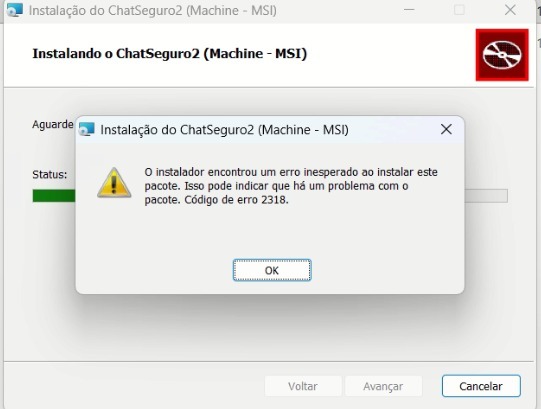
If an error occurs while installing or uninstalling the system, especially Windows Installer failures such as error 2318, you can fix the issue using Microsoft's official tool.
Download Microsoft's official tool